Showing posts with label Tutorial.... Show all posts

May 23, 2009

How to download files from iFile.it!


Easy way to download files from iFile.it


First, Click on the "Request Download Ticket" as shown in the red box on the picture below.


-----------

Second, When the verification page appear, just input the content on the CAPTCHA.
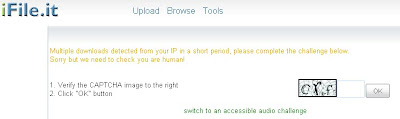
**This is a required if you're downloading multiple files.

-----------

Finally, The Download page will appear, and just click "Download" as shown in the red box on the picture below.



Click Here for more information...

May 17, 2009

Easy way to extracting files

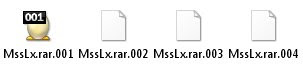
What to do when you encounter *.rar.001 and so on files.

Here's the easy way to extract the files using only two softwares.


First you need is both of these two program.


Download it here:

Download HJ-Split

Download Winrar

After downloading both program, proceed to joining files.
Use HJ-Split to join files.

Joining File:
1. Open Program
2. Click Join
3. Insert the first file by clicking "Input File" (example *.001)
4. Then click Start

After the joining complete, the files will appear as .RAR. For this you need to WinRAR to extract the files.

If you encounter error when extracting file, please go to Extracting Problem page by clicking here!.


Click Here for more information...

May 5, 2009

Problem Extracting files...

Now it seem that almost all files that has been uploaded to mediafire will have the same extracting problem. We already email Mediafire Group about this matter & they will take a look on this matter.


At the moment, if you already downloaded the files but can't extract it please follow this procedure to extract the files.

1. Open WinRaR.
2. Open Archive(The files that you want to extract)
3. Click "Extract To"
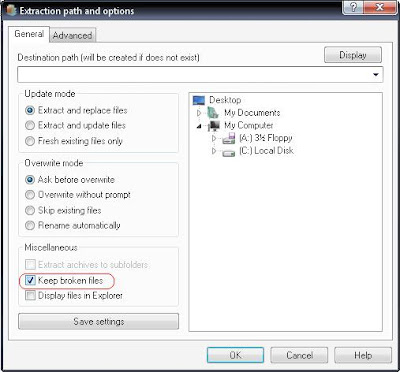
4. On the Extraction and path options, click the Keep Broken Files Box:


5. Click "OK", and the files will be extracted to the desire location.

FYI, The file/video is still watchable and no error what so ever!


Click Here for more information on how to extract files...

April 10, 2009

Problems Viewing MKV or RMVB Videos?

First of all you need is one of these two player:

Media Player Classic - Home Cinema: Download Here!
GOMPlayer: Download Here!

Second, you need to update you multimedia codec: Download Here!
* I Recommend that you install K-Lite Codec & Real Alternative
** If the problem still occur, remove K-Lite Codec and Install CCCP Codec.

FYI:
All videos that been shown here already been tested in WinXP/Vista.

March 7, 2009

How to play MKV videos...


Want to know what is Matroska or MKV is? & How to play this type of video? Click the link Below:

Tutorial on how to play MKV video


x-x-x-x-x-x

Easy way to download from MediaFire...

To know the easy way to download files from Mediafire site click the link below:


x-x-x-x-x-x-x-x-x